To search
Softonic Rating:
Very good:8/10
License:
Evaluation
Added:
October 30, 2007
Publisher:
Website
File size:
753 KB
Downloads:
25
Cyril Roger

“Simplify your workflow”

by Cyril Roger

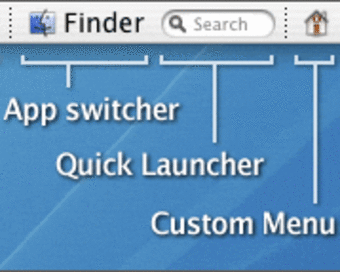
Productivity junkies will like the sound of this: an application that lets you create your own drop down menus and quickly act on any application. MenuStrip is aimed at saving you time by letting you create scripts to launch, hide or quit any application. Busy users will like being able to create their own drop down menu bar, adding applications that they use most and features that they want to access quickly. Your menu bar can be dragged around and set to any part of your screen. Adding menu items is probably the best feature though. The program has no limits to the number of items you create and these can be turned on or off at your whim.

However on the whole we were a bit disappointed by MenuStrip. The latest version of the program says it is Tiger ready, when most of the Mac programs now are getting Leopard ready. Creating your own drop down menu is fun, but adding too many elements can definitely make it feel a bit cramped. We were also left unimpressed by the function to find applications by typing their name, something Spotlight already does.

MenuStrip is useful if you want to access your most commonly used items from your menu bar.

Languages:

English

OS requirements for MenuStrip:

  • OS: Mac OS X

Minimum requirements:

  • Mac OS X 10.4 or later
Pros
  • Create your own drop downs
  • Scripts to execute applications
  • Adding menu items
Cons
  • Only Tiger ready
  • Menu bar can feel a bit cramped
  • Find as you type already in Spotlight
Did you like this review?
1 of 3 users liked it (33%)

MenuStrip Softonic Rating: 8Featured program

Softonic gives special recognition to software of exceptionally high quality. More information

From the publisher of MenuStrip

MenuStrip is a productivity tool for your Mac with many possibilities. It offers the following features:

  • Create your own fully customizable drop-down menus with your most commonly used applications, files, and folders.
  • Add shortcuts in the menu bar to all of your favorite applications.
  • Set alarms as reminders for meetings, events, or the latest creation cooking in the oven.
  • Create scripts to launch, hide, or quit groups of applications at once using Action Buttons.
  • Launch applications and open files simply by typing their name! No more searching through your hard drive to find where you put that important file.
  • With 'Auto-Hide Others' on, as you switch between applications, all background apps will hide out of the way letting you focus on what you need to do.
  • Expand with free plugins that allow you to control iTunes, keep track of your most visited web pages, quickly access the people in your Address Book, and much more...

MenuStrip options

MenuStrip Options
Softonic Rating:Very good
User Rating
Your opinion is important!

Download stats

Are you the developer of MenuStrip?

If your program has received a Softonic rating, feel free to use the following award badge on your site or as part of any other promotional feature you may be putting together.

MenuStrip Softonic Rating

Click on the above text field to copy the necessary HTML to your clipboard and then paste it to your website. It will display your program's Softonic Rating and will link to your program page.

Any queries? Contact us if you want more info.

Close